Content
21 December 2016 / Last updated: 27 Jan 2017
Wifi, Wifi Everywhere!
Execution time:
Difficulty:
Cost:
Has this ever happened to you? You have a resin.io application deployed on a device, which you bring with you to another location, but then have trouble updating the wifi network config to connect? We've created
resin-wifi-connect to solve this practical issue. In a nutshell this application brings up an access point with a web interface where you can configure the new wifi credentials.The
resin-wifi-connect project has been around for a while, but we are now releasing its latest iteration, the 2.0 line. Network management is changing from Connman in resinOS 1.x series (the current production version of the host OS used on resin.io) to NetworkManager in resinOS 2.x series (available on the staging area where we deploy our upcoming features). The latest resin-wifi-connect can handle either networking configuration tool from the same code, thus giving a migration path from resinOS 1.x to 2.x for your application!This is also intended to be the last release of
resin-wifi-connect in its current form, as we are transitioning the project from Node.js to Rust to provide a more portable, stand-alone version in the future. The work has already started, and we are excited to share the progress with you along the way!Yeah, But How Do I Use It?
The ReadMe has extensive information on using
resin-wifi-connect together with your project, including a handy flowchart of what's happening inside, as well as a list of wifi dongles that are supported and those which are known not to work.The gist of using this project is the following:
- Include Node.js and
resin-wifi-connectin your application. - Use the provided start script to start
resin-wifi-connectwhen your application starts, this will set up the connection. - Provide some way for your code to start the
resin-wifi-connectNode.js script with the--clear=trueflag, which clears any saved credentials and puts your device into Access Point mode. This can be done by, for example, a hardware button trigger.
We've put together a
resin-wifi-connect-example to show you how you can combine your code with resin-wifi-connect within your user application.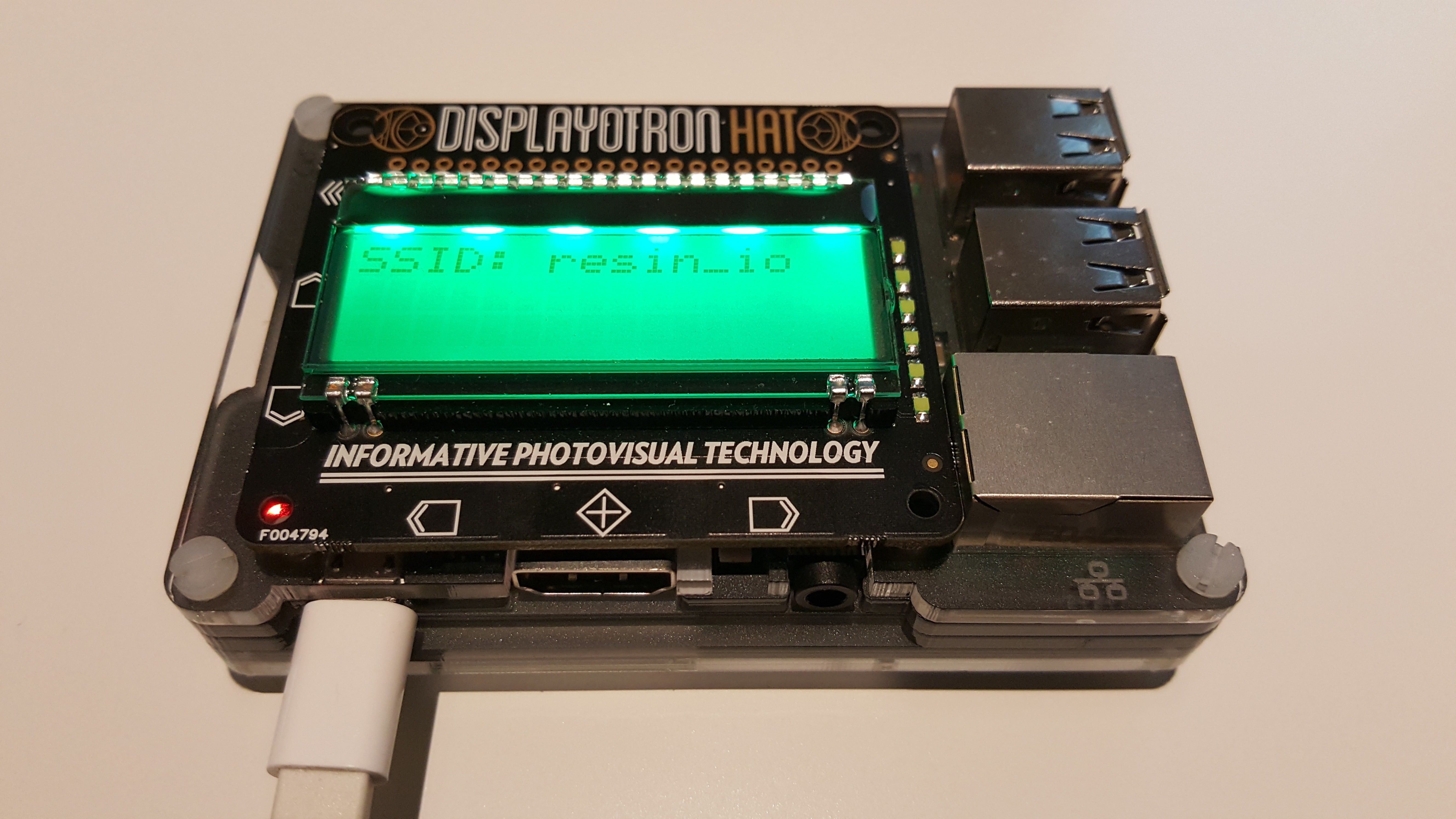
We've collected the required software dependencies and setup lines in the
Dockerfile into a self-contained section, so it's easy to add to any other project:# -- Start of resin-wifi-connect section -- #
Use apt-get to install dependencies
RUN apt-get update && apt-get install -yq --no-install-recommends \
dnsmasq \
hostapd \
iproute2 \
iw \
libdbus-1-dev \
libexpat-dev \
rfkill && \
apt-get clean && rm -rf /var/lib/apt/lists/*
Install node
ENV NODE_VERSION 6.9.1
RUN curl -SLO "https://nodejs.org/dist/v$NODE_VERSION/node-v$NODE_VERSION-linux-armv6l.tar.gz" && \
echo "0b30184fe98bd22b859db7f4cbaa56ecc04f7f526313c8da42315d89fabe23b2 node-v6.9.1-linux-armv6l.tar.gz" | sha256sum -c - && \
tar -xzf "node-v$NODE_VERSION-linux-armv6l.tar.gz" -C /usr/local --strip-components=1 && \
rm "node-v$NODE_VERSION-linux-armv6l.tar.gz" && \
npm config set unsafe-perm true -g --unsafe-perm && \
rm -rf /tmp/*
Install resin-wifi-connect
ENV RESIN_WIFI_CONNECT_VERSION v2.0.1
RUN git clone --branch $RESIN_WIFI_CONNECT_VERSION --depth 1 https://github.com/resin-io/resin-wifi-connect.git && \
cd resin-wifi-connect && \
JOBS=MAX npm install --unsafe-perm --production && \
npm cache clean && \
./node_modules/.bin/bower --allow-root install && \
./node_modules/.bin/bower --allow-root cache clean && \
./node_modules/.bin/coffee -c ./src
-- End of resin-wifi-connect section --
The example is using the app with Python (to show how other languages can be combined with Node.js on resin.io), and a Display-o-Tron HAT to provide visual feedback and buttons to trigger clearing the access point information.
To try this example, assemble a Raspberry Pi with a Display-o-Tron HAT, download the host OS configured with your current wifi credentials, wait until the application is downloaded and the wifi network's SSID is shown on the screen, then press a button to put the device into access point mode. Connect to its network,
ResinAP by default, open a website, and it will show you the captive portal where you can enter your new wifi credentials.x x x
Are you using
resin-wifi-connect? Have some interesting experience to share with us? Drop us a note in the forums! And then, go forth and connect!